Staff scheduling
Employee scheduling software built from your sales forecast
Esplanda drafts next week's schedule from forecast sales, shows its cost before you post, flags overtime and lets staff swap shifts.
Clean hours straight to your payroll provider: hours, labor cost and export-ready timesheets.
Scheduling, the staff app and the time clock are Employee Scheduling & Attendance: $49 per location per month, with no charge per employee or per manager. See how Esplanda works.
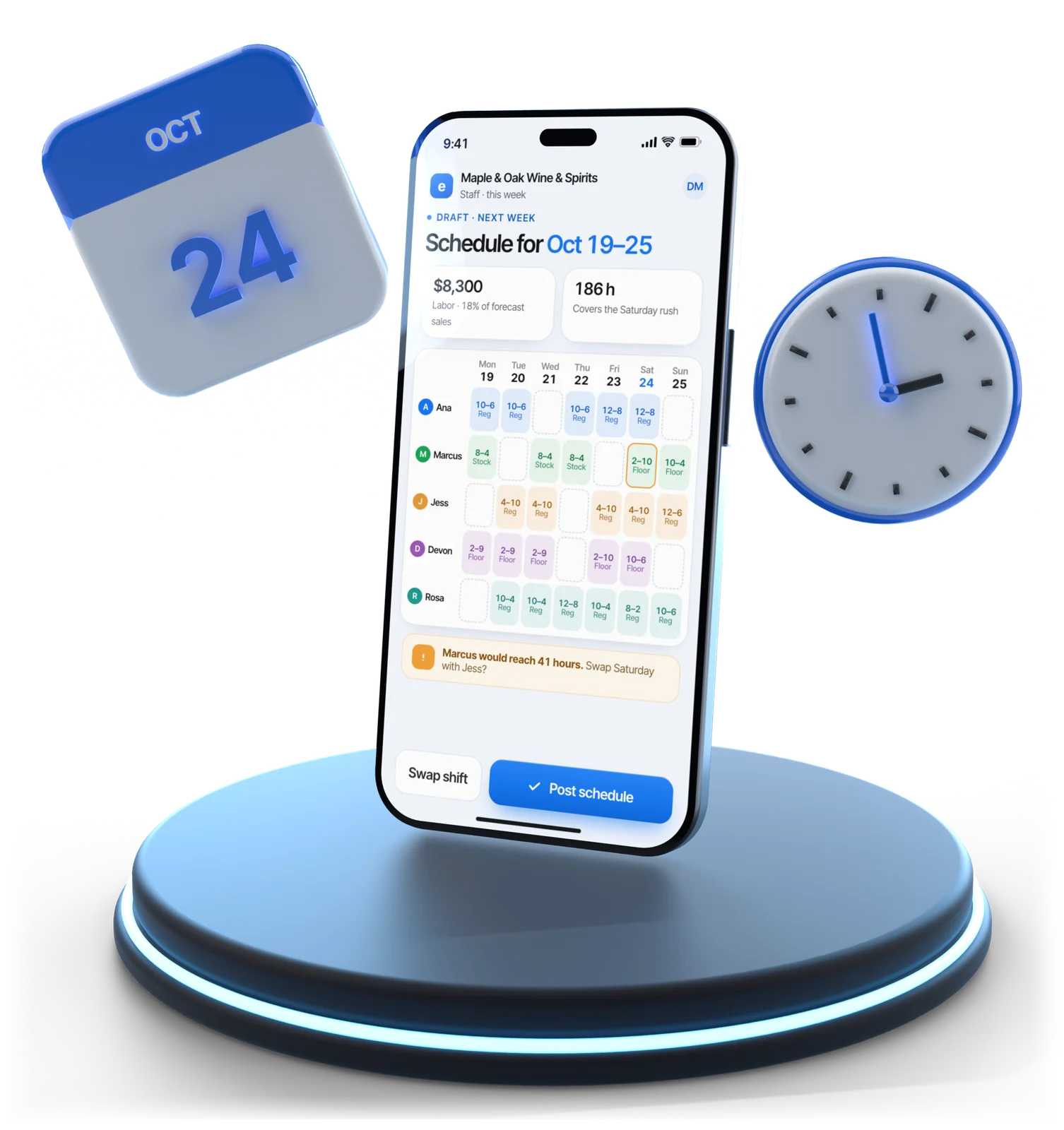
Illustrative example
Next week, not last week
Retail store scheduling for the week you're about to have
Most retail schedules are last week copied forward. That's quick, and it's wrong twice a week: too many people on a quiet Tuesday afternoon, two short on the Saturday before a holiday.
As staff scheduling software, Esplanda starts from next week instead, whether that's a holiday Saturday at a liquor store, Friday night covers at a restaurant or the crew rota at a service business. Six steps, per location, from that location's own history:
Forecast the week, hour by hour
From your sales, the season and local events: the same forecast as our demand forecasting software. Thin history gets a careful schedule.
Turn sales into people
Cover at the register, on the floor and in the back, at the ratios your store actually runs.
Apply your people rules
Availability, time off, hours limits, who's trained for what, and the shortest shift you'll schedule.
Price the draft
Hours times pay rates, in dollars and as a share of forecast sales.
Fix what's flagged
Overtime on the way, an hour with no trained cover, a day above your labor target.
Post it
Staff see their shifts, swap inside your rules and clock in at the register.
Labor cost
See the week's cost before it starts
Most owners learn their labor percentage from the payroll report, weeks after the decisions that made it. By then the only fix left is cutting hours somewhere else.
- Move a shift and the number moves. Add someone to Saturday afternoon and you see what it does to the week, in dollars and as a share of forecast sales.
- Overtime caught mid-week. A covered shift or a late close: it names the shift that would tip someone over. The overtime alert is one of the rules in our business automation software.
Labor as a share of sales then sits in our business reporting software, next to every other cost, and the AI business assistant answers “how many hours did Sarah work this week?” from the same clock-ins.
Illustrative example
Forecast sales, next week$46,000
The draft schedule, priced$8,300
Labor, before you post18%
Your target16%
So you choose which hours to cut now, against the quietest hours of the week, not after the payroll report.
Next week’s schedule, $49 per location per month
- Built
- Next week’s schedule, from forecast demand and your people rules
- Priced
- Its labor cost, in dollars and as a share of forecast sales
- Flagged before you post it
- Overtime, gaps in trained cover and days above your labor target
Employee Scheduling & Attendance. The staff app, clock-in and timesheets for your payroll provider are included, with no charge per employee or per manager. See Esplanda pricing.
The staff side
The employee scheduling app your staff open every shift
The person who opens on Sunday isn't the person who bought the software. The staff app is an employee scheduling app built for them: the part of Esplanda your staff use every shift, on the phone they already carry.
- Swaps and call-outs inside your rules. A swap or an open shift is offered only to people trained for the role, free that day and not tipping into overtime, and the first to accept gets it. A swap that breaks a rule comes to you with the reason.
- Clock-in at the register. Cleanest on our POS system with inventory management, where the clock-in, the sale and the labor cost are one record. Keep the register you have, or use ours: on another register, clock-in runs in the Esplanda app.
- Odd punches flagged. A missing clock-out or a shift that ran four hours long is flagged for you to check, and every correction is kept with who made it, when and what it was before.
- Tasks with proof. A closing task can need a photo before it closes, so you see it was done without walking the store.
- Messages in their language. A manager writes a shift note once; each person reads it in the language set on their own phone. See how Esplanda works in your staff’s languages.
- Training, certifications and tips. Training modules completed, alcohol-server certifications flagged before they lapse, and the tips recorded against each person’s own shifts.
Spreadsheet vs software
Why switch from a spreadsheet to scheduling software
A spreadsheet and a group chat are free and familiar. They also copy last week forward, hide the labor cost until payroll and make you the switchboard for every swap.
| The job | Spreadsheet and group chat | Esplanda employee scheduling |
|---|---|---|
| Next week’s schedule | Last week, copied forward | Built from forecast sales, hour by hour, for each location |
| Labor cost | Found on the payroll report, after the fact | In dollars and as a share of forecast sales, before you post |
| Overtime | Found at the pay run | Flagged mid-week, naming the shift that would cause it |
| Shift swaps | A text to you, then a phone call | Offered only to staff trained for the role, free that day and clear of overtime |
| Hours worked | Rebuilt from texts and paper | Clock-in at the register or in the staff app, with breaks recorded |
| Several stores | One sheet per manager | One person, one running hour total across every location |
| Payroll | Hours retyped for the payroll provider | Export-ready timesheets for the payroll provider you already use |
Running more than one store? Staff who work across locations are scheduled as one person, so overtime can’t hide between two managers; see our multi-location software. And when the rush still beats the schedule, our AI receptionist picks up the calls nobody on the floor can get to.
Payroll
Clean hours, straight to your payroll provider
Esplanda handles everything up to the pay run: the schedule, clock-ins, hours and labor cost, in an export-ready timesheet for the payroll provider you already use.
| The job | Esplanda | Payroll provider | Accountant |
|---|---|---|---|
| Plan the schedule and post shifts | Yes | No | No |
| Record clock-in and clock-out | Yes | Sometimes | No |
| Produce an export-ready timesheet | Yes | Receives it | No |
| File payroll taxes, issue W-2s, pay staff | Hands over clean hours | Yes | Reviews |
| Close the books and file returns | Exports clean numbers | No | Yes |
Questions
Staff scheduling questions owners ask
What is employee scheduling software?
Employee scheduling software builds and posts staff shifts, and handles availability, time off, shift swaps and clock-ins in one place instead of a spreadsheet and a group chat. Esplanda's employee scheduling software also forecasts how busy each hour of next week will be and prices the schedule against forecast sales before you post it.
Why use employee scheduling software instead of a spreadsheet?
A spreadsheet copies last week forward and shows the labor cost only on the payroll report. Esplanda builds the week from forecast sales, prices it before you post, flags overtime mid-week and runs swaps inside your rules, so you stop being the switchboard for Saturday cover.
How does it know how many people I need on a Saturday?
It forecasts demand hour by hour from your own sales history instead of copying last week, reading your weekly rhythm, the season, the trend and the local events that move traffic. Where history is thin, it schedules carefully and shows you which days those are.
Can staff swap shifts without calling me?
Yes, inside rules you set once. A shift is only offered to staff who are trained for the role, aren't already scheduled and wouldn't go into overtime by taking it, and a swap that breaks a rule comes to you as an approval with the reason attached.
Is there an employee scheduling app for my staff?
Yes. Staff get the Esplanda staff app on the phone they already carry: their shifts, clock-in and clock-out, swaps inside your rules, tasks with photo proof, certification reminders and the tips recorded against their own shifts. Staff can also clock in at the register, where hours sit next to the sales they produced.
Can it stop overtime before it happens?
Yes. Esplanda tracks hours building up against each person's limit during the week, warns you in time and names the shift that would cause it. A swap that would tip someone into overtime is never offered.
How does Esplanda handle payroll hours?
Esplanda produces hours, labor cost and an export-ready timesheet for the payroll provider you already use: Esplanda prepares the payroll run, your payroll provider submits it and pays your staff, and your accountant closes your books, with clean numbers from Esplanda instead of a shoebox.
How much does employee scheduling software cost with Esplanda?
Employee Scheduling & Attendance is $49 per location per month, with no charge per employee or per manager, so six staff or twenty-six cost the same. It builds next week's schedule from forecast demand, prices it, and flags overtime, gaps in trained cover and days above your labor target before you post it. Esplanda POS is free, or keep your register.
See what next week costs before you post it
Start free today, or book a demo and we'll build a sample week for a store like yours.
Esplanda POS and your website are free to start, with no card needed. Add paid tools only when you want them. Scheduling is $49 per location per month, with clean hours for the payroll provider you already use.